Memoreel vs Google Drive for Wedding Photos
Planning a wedding means collecting thousands of memories from your guests, photographer, bridal party, and family members. The challenge is not taking photos anymore, it is gathering them all in one place without creating confusion.
Many couples initially think about using Google Drive to collect wedding photos because it is familiar and free. But once the wedding starts, most discover that shared folders are not designed for live event photo sharing.
That is where Memoreel becomes different.
Memoreel was built specifically for weddings and events where guests need a simple, instant, mobile-friendly way to upload photos and videos.
In this guide, we compare Memoreel vs Google Drive for wedding photo sharing so couples can choose the right experience for their big day.
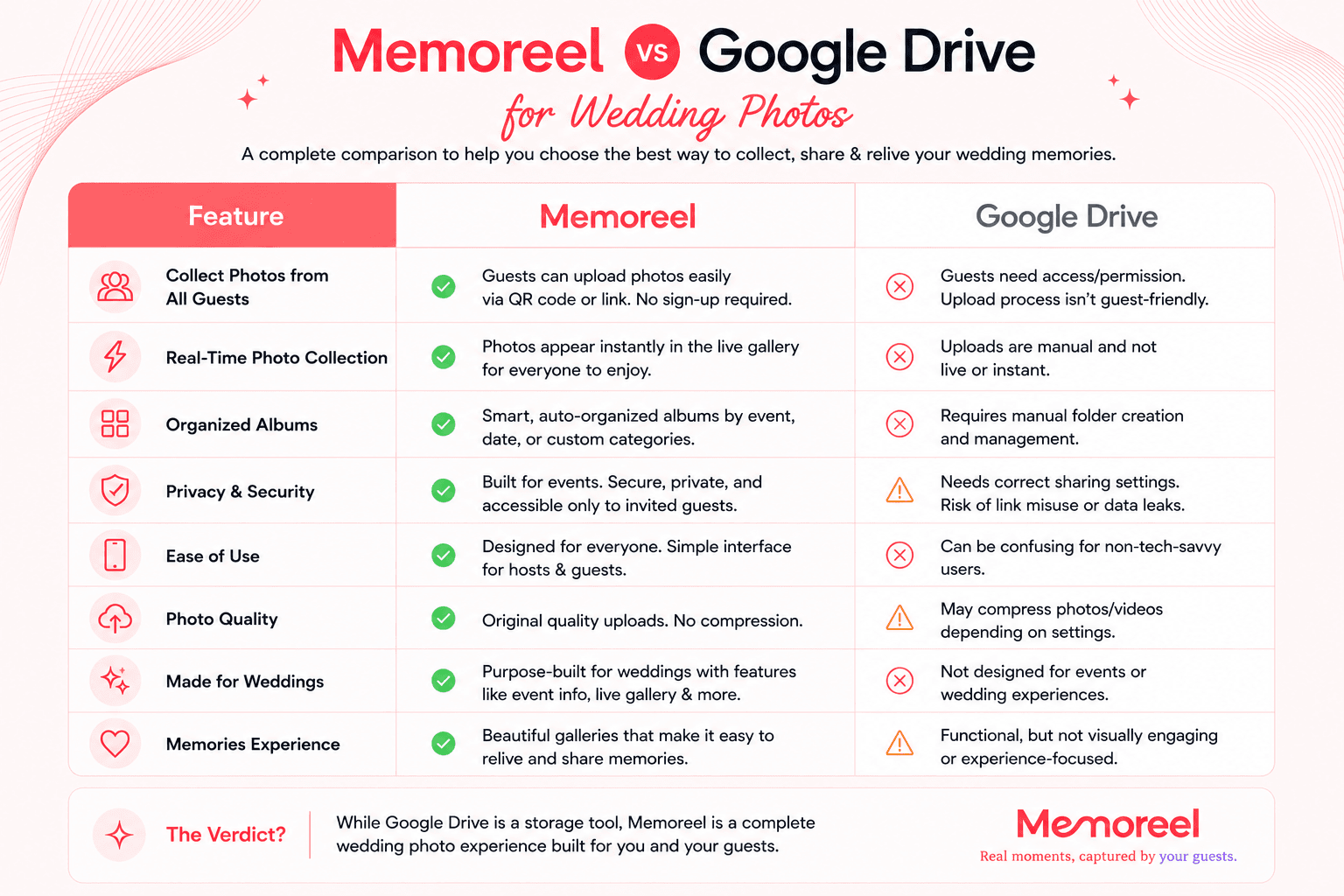
Quick Comparison: Memoreel vs Google Drive
What Couples Usually Want for Wedding Photo Sharing
Most couples want a wedding photo sharing solution that:
- Lets guests upload photos instantly
- Works without downloading an app
- Uses a QR code at tables or invitations
- Keeps all wedding memories organized
- Feels elegant and modern
- Works well on mobile devices
- Allows guests to participate easily
- Creates a fun and interactive experience
Google Drive can technically store wedding photos.
But storage alone is not the same as a wedding photo sharing experience.
Why Google Drive Can Be Difficult for Weddings
1. Guests Often Get Confused
Guests may need to:
- Open a shared link
- Log into Google
- Understand folder permissions
- Navigate upload buttons
- Create folders accidentally
- Upload to the wrong place
For tech-savvy guests this may be manageable.
For older relatives or busy wedding guests, it becomes friction.
Every extra step reduces the number of uploaded memories.
2. Google Drive Does Not Feel Like a Wedding Experience
Google Drive is built for file storage.
It is not designed to feel romantic, celebratory, or interactive.
Wedding photo sharing should feel emotional and exciting.
Guests should feel like they are contributing to the celebration — not submitting files to a cloud storage folder.
3. No Live Wedding Photo Wall
One of the most popular modern wedding trends is displaying guest photos live during the reception.
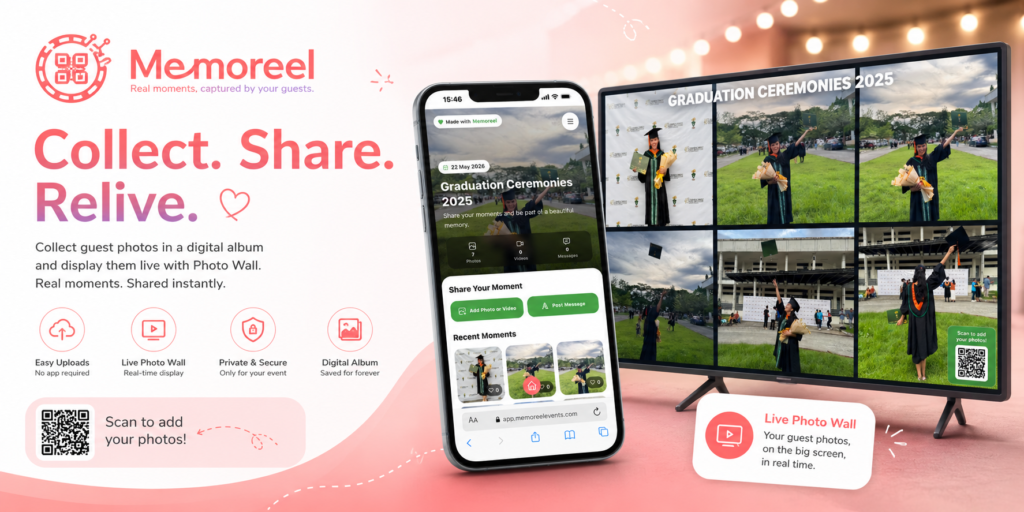
Memoreel allows couples to create a live photo wall where uploaded photos appear in real time.
Google Drive does not offer this type of interactive wedding experience.
4. Shared Folders Become Messy Fast
Wedding guests upload:
- Duplicate photos
- Random screenshots
- Blurry images
- Videos with unclear filenames
Google Drive quickly becomes cluttered because it was not built for collaborative wedding galleries.
Memoreel keeps uploads organized into a dedicated wedding album experience.
5. Google Drive Is Not Optimized for QR Wedding Sharing
Modern weddings often use:
- QR table cards
- QR signage
- QR invitations
- QR photo booths
Memoreel is built around QR-powered event sharing.
Guests simply scan and upload instantly from their browser.
No app installation.
No complicated folders.
No confusion.
Why Couples Choose Memoreel for Wedding Photo Sharing
Simple Guest Upload Experience
Memoreel focuses on one thing:
Making guest uploads effortless.
Guests can:
- Scan the wedding QR code
- Open the upload page
- Upload photos instantly
That simplicity dramatically increases participation.
The easier the process is, the more authentic memories couples receive.
Built Specifically for Weddings
Unlike cloud storage platforms, Memoreel was designed around real wedding workflows.
That includes:
- Wedding guest uploads
- Reception photo sharing
- Digital guestbooks
- Live event galleries
- QR table signs
- Mobile-friendly uploads
- Wedding recap collections
Everything is optimized for celebrations and events.
Better for Non-Tech Guests
One major advantage of Memoreel is accessibility.
Not every wedding guest is comfortable using shared cloud folders.
Memoreel removes technical friction by giving guests a simple upload interface that works directly from their phone browser.
This helps:
- Older relatives
- Children
- Casual users
- Guests without Google accounts
- International visitors
participate more easily.
Live Wedding Memories During the Event
With Memoreel, couples can create a live wedding gallery experience.
As guests upload photos:
- Memories appear instantly
- Guests see each other’s photos
- The reception feels interactive
- More people participate
This creates energy and excitement during the wedding itself.
Google Drive does not provide this kind of social event experience.
Memoreel vs Google Drive: Mobile Experience
Today, nearly all wedding guest photos come from smartphones.
That means mobile usability matters more than desktop features.
Memoreel Mobile Experience
- Designed for phones first
- Simple upload flow
- Fast QR access
- Clean interface
- Event-focused layout
- Easy for guests to understand instantly
Google Drive Mobile Experience
- Generic cloud storage UI
- Smaller upload controls
- Folder navigation required
- Can feel cluttered
- Less intuitive for casual users
For live weddings, simplicity wins.
Wedding QR Code Sharing: Why It Matters
QR code wedding sharing has become one of the biggest trends in modern weddings.
Instead of chasing guests for photos after the wedding, couples can collect memories instantly during the event.
Memoreel supports:
- QR table signs
- QR cards
- Invitation QR codes
- Reception signage
- Photo upload stations
This makes participation effortless.
Google Drive does not offer an event-focused QR workflow.
Which Is Better for Wedding Videos?
Wedding videos are often large files.
Uploading them to Google Drive may require:
- Google accounts
- Upload permissions
- Storage management
- Manual organization
Memoreel simplifies the process by allowing guests to upload event videos directly through the same wedding upload page.
This creates a single place for both photos and videos.
Privacy and Control
Wedding memories are personal.
Couples want control over:
- Who can upload
- Who can view
- Who can access albums
Memoreel is designed around private event sharing.
Google Drive permissions can become confusing, especially when links are accidentally shared publicly.
When Google Drive Might Still Work
Google Drive can still work if:
- You only want basic storage
- You have a very small wedding
- Guests are highly tech-savvy
- You do not care about the guest experience
- You only need a temporary folder
But for couples wanting a polished, modern wedding photo sharing experience, dedicated event platforms usually provide a much better result.
Why Event Experience Matters
Weddings are emotional.
Every interaction guests have with your event contributes to the experience.
A dedicated wedding sharing platform:
- Feels intentional
- Encourages participation
- Creates excitement
- Makes sharing fun
- Preserves memories beautifully
A generic cloud folder does not create the same feeling.
Best Alternative to Google Drive for Wedding Photos
If you are searching for:
- Google Drive alternative for weddings
- Wedding photo sharing app without app download
- QR code wedding photo upload
- Shared wedding album for guests
- Wedding guest photo collection
- Live wedding gallery
- Wedding photo upload website
then Memoreel is built specifically for those needs.
Final Verdict: Memoreel vs Google Drive
Google Drive is excellent for storing files.
But weddings need more than storage.
They need:
- Easy participation
- Instant uploads
- Mobile-friendly sharing
- QR code access
- Live memories
- Interactive experiences
- Beautiful organization
That is why many modern couples choose Memoreel instead of traditional cloud folders.
Memoreel transforms wedding photo collection into part of the celebration itself.
Instead of asking guests to manage folders, couples can simply invite them to scan, upload, and share memories instantly.
Frequently Asked Questions
Can guests upload wedding photos without downloading an app?
Yes. Memoreel allows guests to upload directly from their browser without installing an app.
Is Memoreel better than Google Drive for weddings?
For weddings and events, Memoreel provides a more user-friendly and event-focused experience with QR uploads, live galleries, and guestbook features.
Can I use QR codes for wedding photo sharing?
Yes. Memoreel supports QR-based uploads that guests can scan during the event.
Does Google Drive work for wedding photo sharing?
It can work for basic storage, but it lacks event-focused features designed for weddings.
Can guests upload both photos and videos?
Yes. Memoreel supports both photo and video uploads from guests.
Create a Better Wedding Photo Sharing Experience
Your wedding memories deserve more than a shared folder.
Memoreel helps couples collect real moments from guests in a simple, elegant, and interactive way.
From QR uploads to live galleries and digital guestbooks, it is designed to make wedding memory sharing effortless for everyone involved.